Photographing the Moon It’s the best way to start with astrophotography. The moon is bright, large, and easy to find, and you don’t need a dark sky for it. With your phone behind the eyepiece of a telescope, you can take your first photo in just a few minutes. With a camera on your telescope and some post-processing, you can capture craters that you would never see with the naked eye. On this page, you’ll learn which approach works best for your equipment, which settings work, and how to get more detail out of your photos.
Which method suits your belongings?
| Fashion | What do you need? | What does it cost? |
|---|---|---|
| Phone behind the eyepiece | A telescope and a smartphone adapter | The entire moon or part of it, depending on your ocular device. Fast result. |
| Camera with telephoto lens | A DSLR or system camera, a telephoto lens of 300 mm or more, and a tripod | The moon as a small disk, beautifully combined with a landscape. |
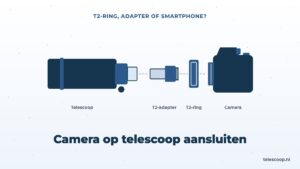
| Camera on the telescope | A camera without a lens, a T2 ring and a T2 adapter | The entire moon is sharp and large in the image. |
| Planetary camera on the telescope | A astrocamera, a laptop and free software | Crateries up close, or the entire moon as a mosaic of individual pieces. |
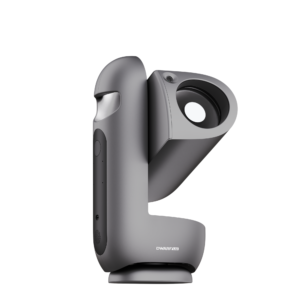
| Smart telescope | A smart telescope with the moon phase | The entire moon, automatically focused and illuminated. |
How to connect a phone or camera to your telescope, you can read step by step in Connecting the camera to your telescope.
How big is the moon in your photo?
That depends solely on the focal brandlength of your lens or telescope. A handy rule of thumb: divide the focal brandlength by 110, then you have the diameter of the moon on your sensor in millimeters.
| Focal length | Moon on the sensor | What fits on it |
|---|---|---|
| 300 mm (telephoto lens) | about 3 mm | Every camera, the moon is small in the image. |
| 650 mm (small Newton) | about 6 mm | Any SLR or system camera. |
| 900 mm | about 8 mm | Any SLR or system camera. |
| 1500 mm (Maxutov of 127 mm) | about 14 mm | Exactly like an APS-C sensor, easy to switch to full frame. |
| 2000 mm | about 18 mm | Only at full frame, on APS-C it becomes a crop. |
An APS-C sensor is about 23 by 15 mm, a full-frame sensor is 36 by 24 mm. Small planetary cameras have a sensor of a few millimeters. With this, you can photograph part of the moon with most telescopes, or you can create a mosaic of multiple shots.
How do you photograph the moon with your phone?
The base is located in astrophotography with smartphone. For the moon, these are the points that make the difference:
- Use a smartphone adapter. It sometimes works by hand, but with a holder the camera is positioned directly behind the eyepiece and you get a sharper photo much more often.
- Start with the eyepiece with the largest number, for example 25 mm. Then the entire moon is in view and you can easily find it again.
- Lower the exposure. Phones almost always overexpose the moon, causing the craters to disappear into a white blob. Tap the moon and lower the brightness, or set the ISO low and the shutter speed short in pro mode.
- Do not zoom in digitally. If you want to make the moon larger, use an eyepiece with a smaller number or a Barlow lens.
- Use the self-timer or a Bluetooth remote to prevent touching the telescope during the photo.
- Make a short video instead of a photo. You can later extract the sharpest images from the video, see further down.
During a nearly full moon, a moon filter Also for your phone: the camera gets less light and is less exposed to noise.
Which settings do you use with a camera?
If you are using a DSLR or a system camera, with a telephoto lens or on your telescope, start with these settings:
- Position: manually (M), and shoot in RAW. Then you have the most room in the post-processing.
- ISO: low, between 100 and 400. The moon is bright enough.
- Shutter speed: briefly. Look at the histogram: the lightest part of the moon should not be directly against the right side. With a full moon through a telescope of f/5 to f/10, you can get approximately ISO 200 between 1/1000 and 1/250 seconds. With a half moon or a crescent, you expose longer.
- Rule of thumb for a telephoto lensWith a f/11 aperture, the correct shutter speed for a full moon is approximately 1 divided by your ISO value. At ISO 200, that would be 1/200 second.
- Focus: with live view, zoomed in on the terminator. That's where the sharpest edges are. Take your time with this, because it determines more than all the other settings.
- Preventing vibrations: Use a remote control or the self-timer for two seconds. On a system camera, turn on the electronic or silent shutter; on a reflex camera, turn on the mirror pre-release.
The moon moves without tracking motor Slowly through your lens, but with these short shutter speeds merk you can’t really see anything in the photo. So even a Dobson without a motor is fine for moon photos. With a long brandfocal length, you’ll have to push it a lot more often.
How can you get more detail from your moon photos?
The air above you always vibrates a little. Because of this, one shot is sharper than the other, even if you don’t change anything. Astrophotographers take advantage of this: they film the moon for a minute, let software choose the sharpest images and then stitch them together. This is called stacking. The result is much sharper and has less noise than a single photo.
Here's how to do it:
- Film the moon for 30 to 60 seconds, using a video camera in the video mode or a planetary camera on your laptop. Use the same short shutter speed as for a photo.
- Let the free program AutoStakkert! stack the top 10 to 25 percent of the images.
- Sharpen the result in RegiStax using the so-called wavelets. Do this carefully, otherwise you will get hard edges and noise.
How to stack works, you can read it in What is stacking in astrophotography. Which programs you use for this is stated in our explanation of astrophotography software.
If you want to see craters up close, place a Barlow lens between the telescope and the camera. This doubles the focal brandlength. The entire moon will no longer fit into the frame, but you can photograph it in pieces and combine the individual shots in a panorama program to create a large mosaic.
When is the best time to photograph the moon?
As with looking through a telescope, the most beautiful relief is along the terminator, the boundary between day and night on the Moon. Around the first and last quarter, that gives the photos with the most depth. Which craters you discover per lunar phase, you can read in the moon through a telescope.
A few moments that each produce a different kind of photo:
- Half Moon: long shadows along the terminator and craters with depth.
- Full moon: little relief, but there are some light rays around the Tycho crater and a lot of contrast between the dark seas and the light highlands.
- Narrow strip with earth glowShortly after the new moon, low in the west after sunset. With longer exposure, you see the dark part of the moon faintly light up. The illuminated edge gets overexposed, that’s how it’s supposed to be.
- New Moon: Low above the horizon and often colored orange. Photographed with a telephoto lens from a considerable distance, it stands large behind a church tower or windmill.
The data for each phase can be found in our lunar calendar. Choose a night when the moon is high: the less air between you and the moon, the sharper the photo. If you want to photograph a lunar eclipse, check the lunar eclipse for the upcoming dates and tips for that night.
Can you photograph the moon with a smart telescope?
Yes, and that’s often the first thing people do with them. Smart telescopes like the Seestar and the DWARF have a separate moon stand that adjusts the focus and the exposure itself. How sharp the result is depends mainly on the aperture and the sensor. In our comparison of the DWARF 3 and the DWARF Mini For example, craters in DWARF 3 become sharper when you zoom in. If you have a Seestar, the camera will zoom in to the point where the online course in astrophotography a lesson about sharp moon photos.
Do you need a moon filter to photograph the moon?
Not with a camera: you adjust the brightness using your shutter speed and ISO. For your phone, a moon filter can help, because phones like to adjust the exposure themselves and the moon can overexpose the image. If you also look through the eyepiece yourself while taking the photo, a moon filter makes the image much more pleasant to the eye. Which filter is best, you can read in our guide the best moon filter for your telescope.
Read more
Is your phone or camera not yet connected to your telescope? In Connecting the camera to your telescope Read about which adapter you need. If the moon sounds appealing, Jupiter and Mars are the logical next steps: they use exactly the same technique of filming and stacking.